Example 56 - Anisotropy (mk_pbr_desc.specular_roughness_anisotropy / _rotation).
← All examples56_anisotropy
Anisotropy stretches the specular highlight along the surface grain (brushed metal, vinyl records, hair). It is anisotropic GGX on the base specular/metal lobe: roughness grows along the tangent while staying the material roughness along the bitangent, and the IBL reflection is bent toward the anisotropy bitangent. A plain mk_pbr_material field, so it works on hand-built spheres exactly as on a loaded glTF primitive. Requires both packages: ./scripts/build-linux.sh --pbr --ibl --target=56_anisotropy Grid of brushed-metal spheres under IBL: rows (top->bottom) sweep anisotropy strength 0 -> 1; columns (left->right) sweep base roughness 0.15 -> 0.6 (where the stretch reads best). The top row (strength 0) is the isotropic reference -- it must match a plain metal sphere. R rotates the grain to spin the highlight. Controls: A = toggle anisotropy, R = rotate grain, drag = orbit, scroll = zoom, H = headlight, TAB = debug, ESC = quit.
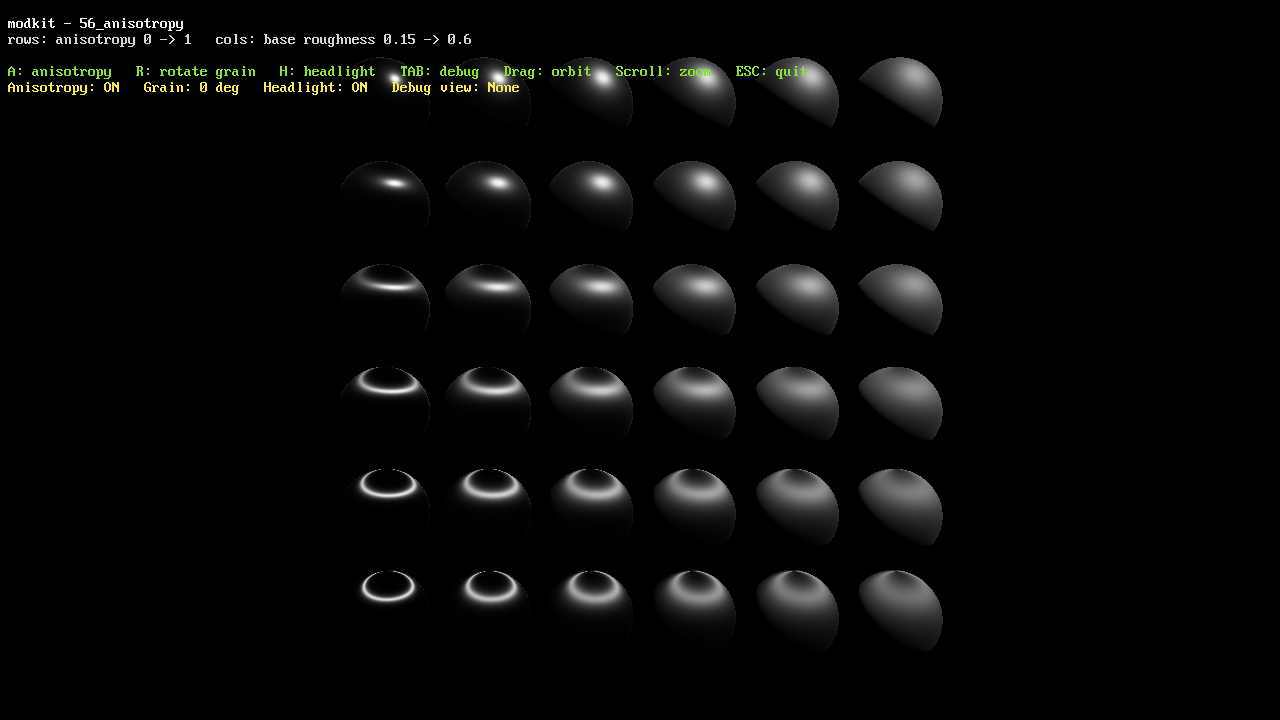
Runs the WebAssembly build on this page. Click the canvas to give it keyboard focus.
- Number
- 56
- Tags
- Source
examples/56_anisotropy/main.c
Build and run
./scripts/build-linux.sh release --target=56_anisotropy --run